AUTOMATED ROYALTY SPLITS

Automated Royalty Splits That Run Themselves

Automated royalty splits are rules that divide music earnings among contributors by preset percentages every payment cycle. LabelGrid calculates each share automatically when DSP royalties arrive, applying recoupment and logged expenses, then generates statements and triggers payouts. No spreadsheets, no manual math. Splits are included on every LabelGrid plan.

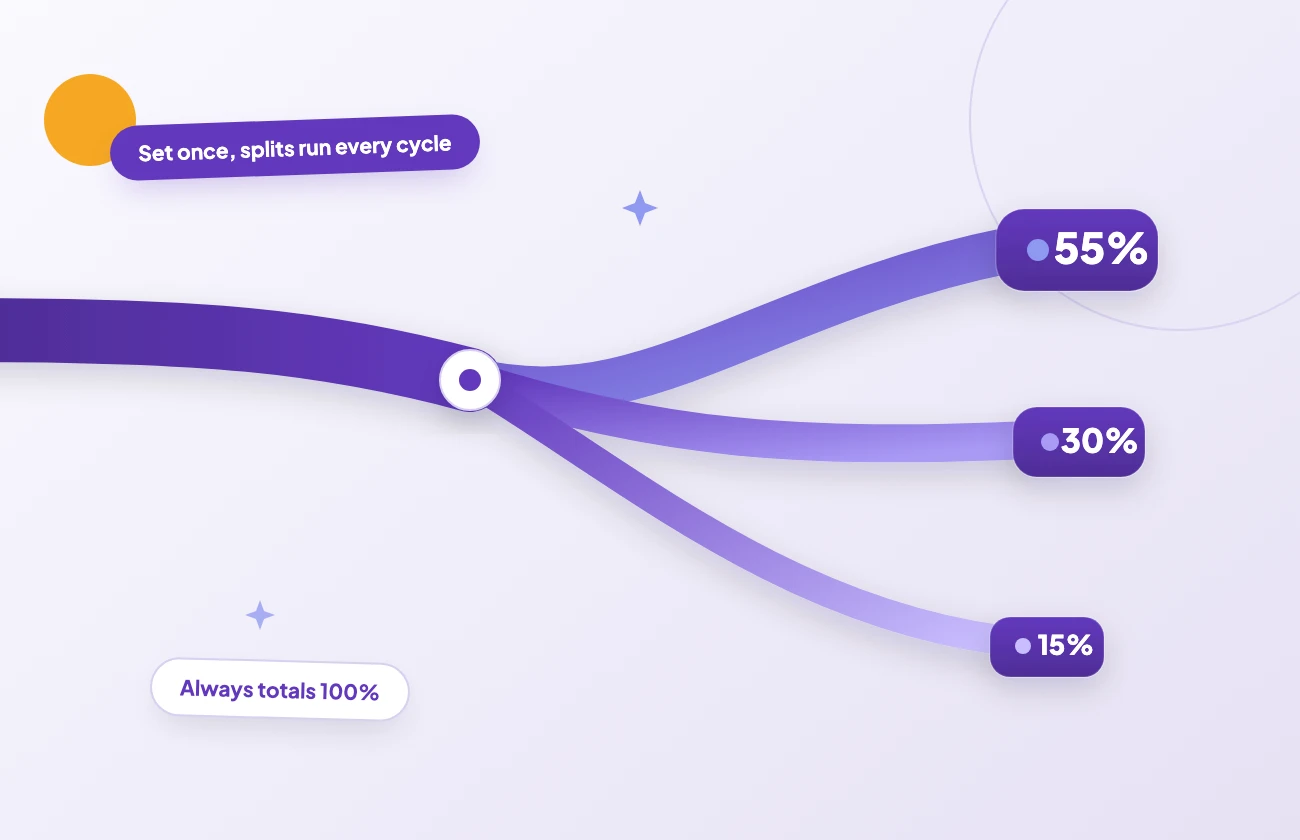
One earnings stream forks along flowing gradient ribbons into three rounded contributor share badges of 55, 30 and 15 percent totalling 100%, set once and running every payout cycle

SPLIT CONFIGURATION

How do automated royalty splits work?

You define each contributor’s percentage once, per release or per track. The same configuration holds your label’s distribution fee and any recoupment terms. From then on, every payout cycle applies those rules automatically. A remixer who earns 15% on one single and an in-house producer on standing points are both handled the same way. Change a percentage and it takes effect from the next cycle, so a one-off collaboration and a long-term roster deal can live side by side. For labels running splits across a whole roster, the same engine scales without extra per-release work.

See how labels use LabelGrid →

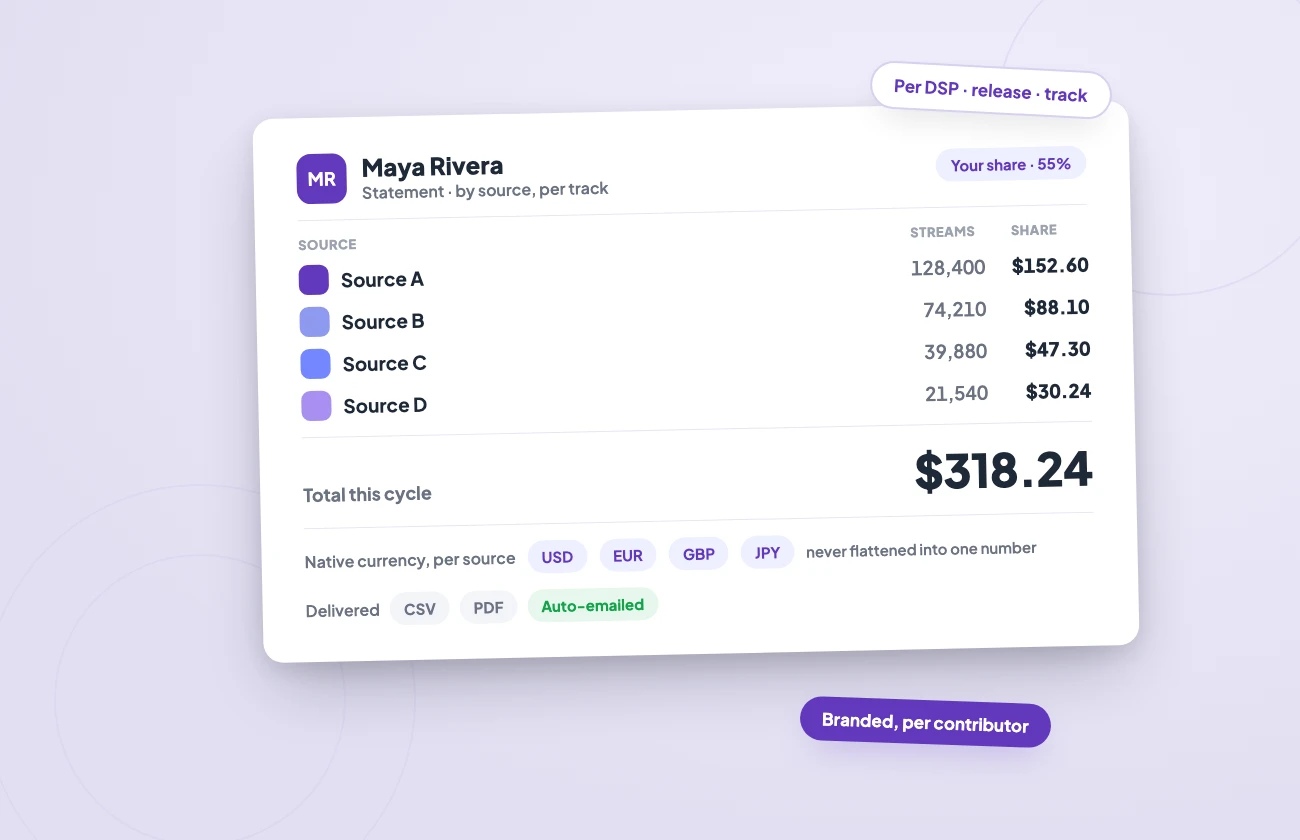
A contributor statement broken down by source: streams, rate and each person's exact share, tracked in native currency
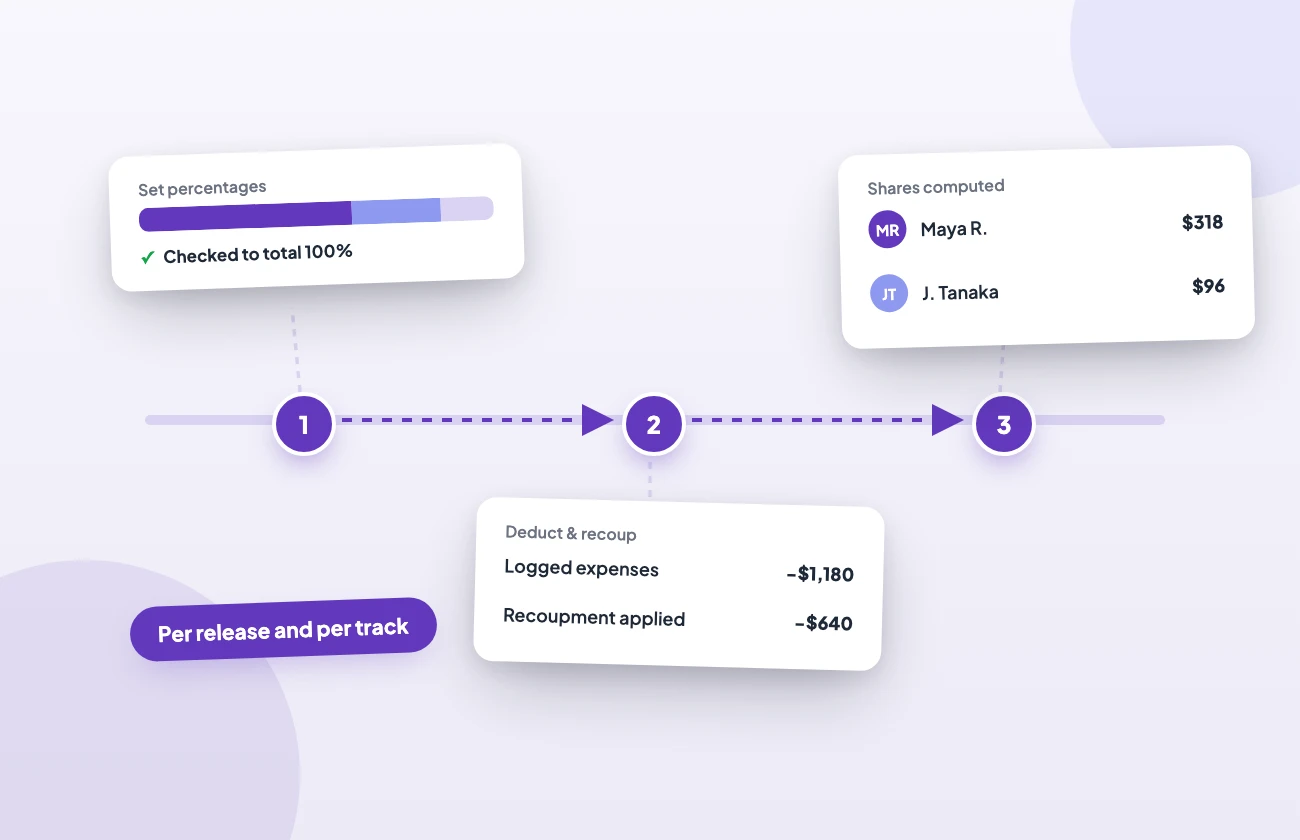
Three connected steps: set percentages to 100%, deduct expenses and recoupment, then compute each contributor's share

MULTI-PARTY PAYOUTS

What does each contributor see on a statement?

Every statement breaks earnings down by DSP, release, and track: which platform paid, how many streams, the rate, and the contributor’s exact share. Payments arrive from each platform in their native currency and are tracked per DSP, so multi-currency earnings stay accurate instead of being flattened into one number. Export a statement as a PDF to send to the contributor, or pull transactions as CSV for your books. Splits feed directly into full royalty accounting, putting expense ledgers, invoicing, and monthly payouts in the same place. See the artist payouts guide for setting up statements and the payment workflow.

HOW IT WORKS

How to set up a royalty split in three steps

1. Configure

Choose the contributors and their percentages, per release or per track. Add your distribution fee, producer points, and any recoupment terms. Percentages are checked so each split totals 100%.

2. Process

When DSP royalties arrive, LabelGrid computes every contributor’s share automatically across Spotify, Apple Music, and the rest, per release and per track. Committed expenses then reduce those balances until they are recouped.

3. Pay

Generate statements each cycle, approve them, then record each payment as you send it. LabelGrid tracks the whole payment lifecycle, so every party gets a clear record of what they earned.

Stop Calculating Splits by Hand

Published pricing. No per-release fees. Free 7-day trial.

EXPENSE RECOUPMENT

How does recoupment affect a split?

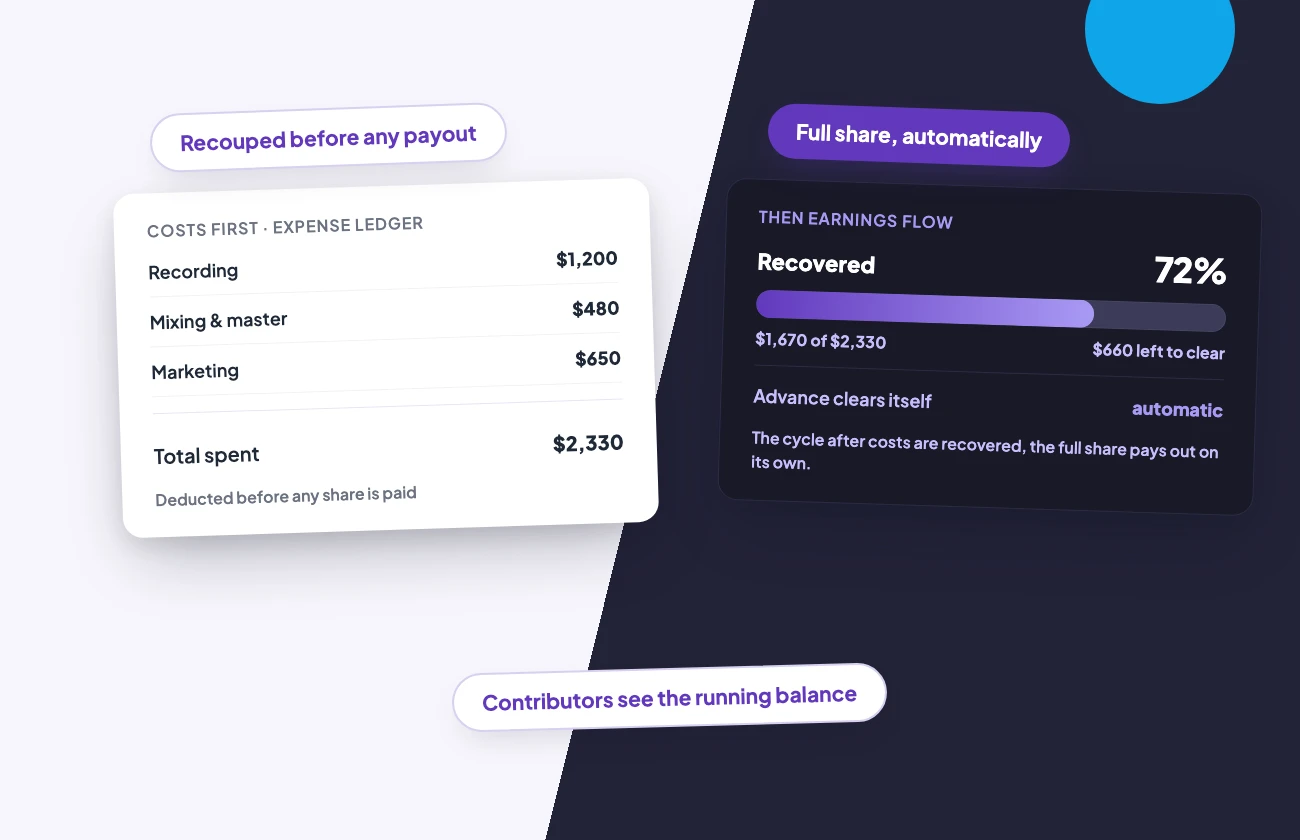
Log recording, mixing, mastering, and marketing spend against the specific release it belongs to. Earnings are credited to each artist by their split, then those costs reduce the artist’s balance, and recoupment runs every payment cycle until it clears. An artist on an advance starts earning their full share automatically the cycle after costs are recovered. Contributors see the running balance: what was spent, what was earned, and what they’re still owed. There are no per-release or per-split fees. Royalty splits are part of LabelGrid’s accounting tools, and plans start at $99 per year with every price published up front.

An expense ledger and recoupment meter showing costs recovered before any share is paid, with the running balance
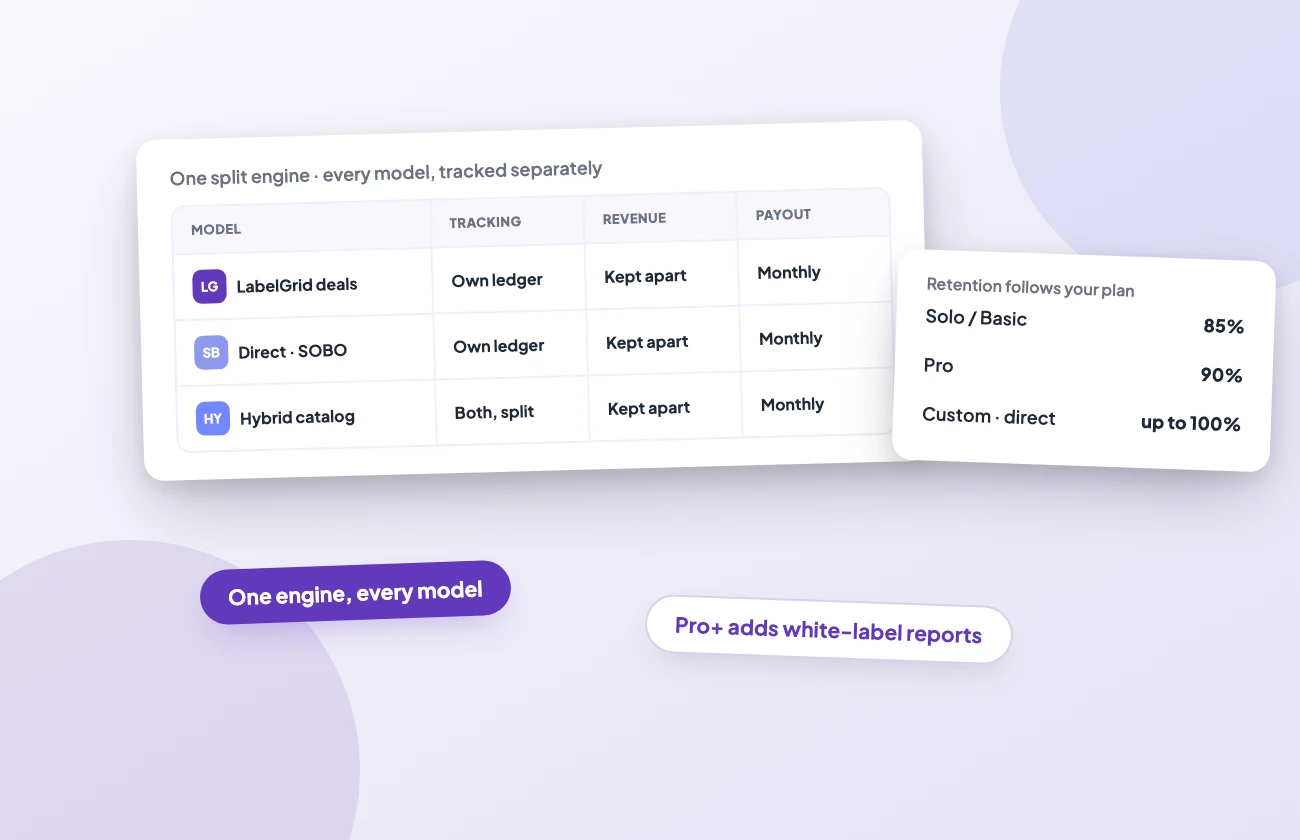
One split engine across LabelGrid, direct/SOBO and hybrid catalogs, each tracked separately with plan-based retention

SPLITS AT SCALE

Do splits work across distribution models?

Yes. The same split engine runs across LabelGrid distribution deals, direct deals delivered on your own behalf (SOBO), and hybrid catalogs that mix both, with each model tracked separately so revenue is never blended. Retention follows your plan: 85% on Solo and Basic, 90% on Pro, and up to 100% on Custom. You keep 100% when you deliver under your own direct or Merlin deals via SOBO. There is no minimum payout threshold today. Payouts run monthly, and earnings update by DSP, release, and track as statements process. Pro plans and above add advanced analytics plus white-label reports carrying your own label’s identity. For distributors building on top of LabelGrid, the same accounting runs through the white-label REST API.

MORE FEATURES

Discover All LabelGrid Services

Distribution

Distribute music to all major platforms with advanced metadata and batch operations.

Catalog Management

Manage releases, tracks, artwork, and metadata across your entire catalog from one dashboard.

Royalty Accounting

Automated royalty processing, expense ledgers, invoicing, and transparent statements for your whole roster.

White Label & API

Run your own branded distribution platform with LabelGrid’s white-label infrastructure and REST API.

COMMON QUESTIONS

Frequently Asked Questions

Automated royalty splits divide a release’s earnings among its contributors by configured percentages. LabelGrid calculates every party’s share automatically when DSP payments are processed – including expenses, recoupment, and your label’s fee.
Yes. Splits are configured per release or per track, so one-off collaborations and standing roster deals both work. Each configuration applies automatically every payout cycle.
Earnings are credited to each artist by their split first, and committed expenses then reduce that artist’s balance, so recoupment runs automatically each payment cycle until the balance clears.
LabelGrid pays your own cleared royalties out monthly by bank transfer or wire, and there is no minimum payout threshold today. Paying your roster is a separate flow, and LabelGrid does not move that money for you: it builds the payment request from the approved statement, you send the payment through your own bank, then you mark it paid so the ledger and the balance stay right.
Yes. Every statement shows DSP-level detail – platform, streams, rate, and each party’s share. Export a statement as a PDF to send to the contributor, or export transactions as CSV for your own accounting.
Yes. Splits apply across LabelGrid distribution deals, direct deals delivered on your own behalf (SOBO), and hybrid catalogs, with each model tracked separately. Royalty retention depends on your plan and deal type: 85% on Solo and Basic, 90% on Pro, and up to 100% on Custom. You keep 100% when you deliver under your own direct or Merlin deals via SOBO.
No. There are no per-split or per-release fees. Automated royalty splits are included on every LabelGrid plan, alongside expense ledgers, statements, and payouts. Plans start at $99 per year for Solo, and every price is published on the pricing page.
Splits are one part of LabelGrid’s royalty accounting suite, which also covers expense ledgers, statements, invoicing, and payouts.

Start Your Free Trial

Automated royalty splits, recoupment, and contributor statements — one dashboard, published pricing, no per-release fees.